
Blog

Progress Vs. Significant Progress

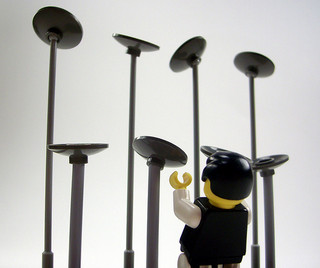
Lego man spinning platesLet’s talk about your progress. What kind of progress are you making in your business?

Progress or significant progress?

I’m guessing you’d like to be making significant progress, right?

Over the weekend I heard someone describe the difference as trying to move 12 projects forward at once versus trying to move two projects forward at once.

When you’re working on 12 projects you maybe take a step or two forward in each project every week, progress is pretty slow.

However, when you’re focusing on just two projects you can move them forward much faster, now you take a step or two forward in each project every day.

The picture I had in my mind was of spinning plates in the air. When you have a dozen plates spinning you’re adding momentum to one plate and keeping an eye on the ones that are starting to wobble so you can run over and take care of those next.

It quickly gets really tiring! You’re never able to fully focus on one plate at a time because you need to keep an eye on which ones are about to come crashing down.

However, when you have just two plates spinning, you can add momentum to one and not worry about the other one for a bit. You’re able to fully focus on one plate.

When you’re able to have that full focus on one thing, you start making significant progress.

What would your business look like if you made significant progress?

Would you be making more money? Helping more people? Have more free time? Spending more time with your family?

Tell me, what would significant progress look like in your business and what gets in the way?

photo credit: Jameson42 via photopin cc

What If You LOVED Your Workday?

Young Female Lying On The Grass In The Park Using A LaptopHow does your day usually start?

Not the getting out of bed part of your day, the business part of your day.

How does the business part of your day usually start? Do you have any habits? What are you thinking? Are your thoughts your habit?

So, do you start your day stressed out, worrying about how you’re going to get the long list of tasks done. Maybe doing a couple really quick ones just so you feel like you’re making progress, and maybe avoiding the more important and intimidating task?

What are you thinking about that list of tasks?

What if you were excited by them instead of feeling like you have to do them?

What if instead of feeling constantly behind by everything you should be doing or should have accomplished you were excited for the things that are happening in your day and business?

What if you didn’t worry about what you’ll find in your email today, but were excited to hear from people? To find out what they needed? Or out how you can help them and how that works into your schedule?

What if instead of being annoyed that someone asked you to do something extra, you were excited about the prospect of helping them?

Would if feel like work then? How would that change your business? How would that change your life outside of your business?

Does even thinking about that possibility feel foreign to you?

I know there was a time in my life where  I would have read what I wrote above and said, that’s great, but I’d rather not live with my head in the sand to all the work that needs to get done. And then pile on more things to do because I’m so busy being happy by all the extra work people are sending me.

So, let me be clear – I am not suggesting that you accept every request with happy abandon.

I am suggesting that it is possible to be happy about those requests AND have a plan or process for them.

So, you’re not just happily saying yes when a client emails you with a last minute request – you’re using the processes you already put in place to tell them that you’d love to do that with/for them, but last minute rush jobs cost this much extra. Or I can do that for you in two weeks because I want to honor the commitments to my current projects.

There are boundaries and processes you can set up so it’s easy for you to navigate requests and you’re teaching your clients (and others!) how you work so you have fewer of those requests coming in.

If this is something you’d like to explore in detail, let me know!

How does your workday normally start? And how do you want it to start?

Share in the comments below!

Image courtesy of photostock / FreeDigitalPhotos.net

Finding Time for Your Big Projects

girl taking notesAre you someone who knows exactly what’s on your plate? The things that need to get done daily and weekly or even monthly get done. You keep up with current clients, bills are get paid and all those other things that you regularly do in your business get done.

And you’re frustrated. Why?

Because even though you’re staying on top of all the details, you don’t have time for your bigger goals, the bigger projects that will move you into the next phase of your business.

You don’t want to stop doing the things that currently pay the bills. But you also want to find time for those other projects.

So, what do you do?

How do you add time to your week so you have time for those projects?

You take a step back and review:

  1. Time leaks – How are you currently spending your time?
    Are you spending too much time checking email? Facebook? Twitter? YouTube? Where are you spending too much time online?

    When do you tend to spend too much time on those sites? Is it triggered by something? What can you do to spend less time on that site?
    What tasks take you a long time to complete?

    Why do those tasks take so long (be kind with yourself!)? Are they tasks that you don’t like doing or are not in your skill set?

  2. Systems
    What are the things you do every week or every month? Is there a system you can create around them?

    Maybe you have a series of steps that you take each new client through. Do you have those steps documented, emails drafted and attachments all in one spot so you can quickly (and warmly) welcome them?

    Where can you add systems in your business?

  3. Hire it out
    There are some tasks that you certainly can do, but aren’t in your skill set. These could be some of the tasks you identified in “Time Leaks.” You can do them, but if you paid someone else to do it they’d do it faster and maybe even better.
    Or these tasks might be in your skill set, but your clients don’t pay you for that work.
    For example, I’m very comfortable with technology, I used to be a programmer. When it was time to put together my website I could have spent time to learn the ins and outs of WordPress and done it myself. However, I decided my time was better spent elsewhere and paid someone else to do it for me. That saved me hours of work.
    What are those things in your business?

An alternative to all of these things is to spend more time at work. While occasionally this is a necessity, it’s probably not something you want to regularly be doing.

So, what will you do to that will free up time in your work week?
Share in the comments below!

© Photographer: Dreamstime Agency | Agency: Dreamstime.com

What’s Your Definition of Busy?

Girl WorkingLet’s talk about one of my least favorite words: busy.

According to Merriam-Webster.com the definition is:

  1. a. engaged in action: occupied
    b. being in use
  2. full of activity: bustling
  3. foolishly or intrusively active
  4. full of distracting detail

The definition I like and strive for is “engaged in action,” although I might change it to “engaged in intentional forward moving action.”

However, usually when I find myself (or clients) using the word busy, what I really mean is “full of distracting detail.”

This isn’t always the case, but in my past I’ve used it in that way so many times that I have some baggage with the word and tend to avoid it all together.

When you’re busy, which definition are you usually using? What definition would you like to be using?

Share below!

Gmail’s Changes: Annoying or Helpful?

Girl emailWhenever I’m talking to someone about what is or isn’t working in their day/business, usually the topic of email will come up. And most of the time it’s mentioned with an exasperated sigh.

I get it, we all get a lot of email and some businesses have more of it than others do. But regardless of where you fall on the spectrum, email can be overwhelming.

So, when I heard Google was rolling out some changes to their email (gmail and apps users), I was intrigued. (Gmail added 3-5 tabs to the main inbox that they will sort your emails into. Primary, Social and Promotions are the three tabs everyone seems to be getting. I also see options for Updates and Forums tabs.)

What I wasn’t prepared for was the rash of emails my inbox received from people/businesses I get newsletters from letting me know that Gmail is now deciding which emails actually show up in people’s inboxes.

Now, I admit it, I subscribe to ALOT of newsletters, but I was still surprised when over the course of 24 hours I received 7 emails on the subject from various people/businesses I’m subscribed to. Since then, about two days, it has slowed down – only 3 more.

Most of them had the tone of “what is Gmail doing!?” and “this will negatively affect your business!” However, a couple had a more laid-back tone of, “hey, Gmail is rolling out some changes, just wanted you to know.” And all had instructions for how to (1) put their emails in the “Primary” tab or (2) remove the tabs all together.

In reading around the internet the general opinion seems to be “GAH! Changes! BOOO…” and “why don’t people just set up their own filters for this stuff?”

And, frankly, when I received the changes, I DID NOT like it. But, I didn’t like it because I’ve set up filters, and a separate email address, to basically serve the same function. Having Gmail filter on top of my filters was annoying.

That said, ALOT of the entrepreneur’s I work with and talk to don’t want to figure out how to set up a filter. And now they can easily ‘teach’ Gmail which emails belong where with a couple of simple clicks.

And for those of us who don’t want the changes, we can very easily turn the categories off.

Sounds like a win to me!

Have you been affected by Gmail’s changes?
Either way, what are your thoughts on this?
Share your opinions in the comments below!

PS. There’s a great article over on mashable.com that outlines the changes, how to move emails between tabs and disable the changes all together. Check it out here!

Image courtesy of arztsamui / FreeDigitalPhotos.net